This service is not monitored for emergencies. In the U.S., call or text 988; call 911 for immediate danger.

Therapy practice management software

More time for care. Less practice friction.

Scheduling, secure coordination, structured notes, billing, assessments and reviewed court reporting in one bilingual workspace - built to support solo clinicians and grow with multi-provider practices.

Organization-isolated data Shared ASL sign-in English and Spanish Human-reviewed workflows
Practice overview
Today at a glance
Today6
Drafts3
Reviews2

One operating system for the practice

Everything a therapy practice runs on, in one workspace.

Most practices stitch together a calendar, a notes tool, a billing system, a file share and a folder of Word templates — then spend their evenings reconciling them. ASL Therapy replaces that with a single workspace where the schedule, the clinical record, the paperwork, the billing and the client’s own portal are the same system. Everything below is the actual product, running on synthetic pilot data.

Start the day knowing exactly what needs you

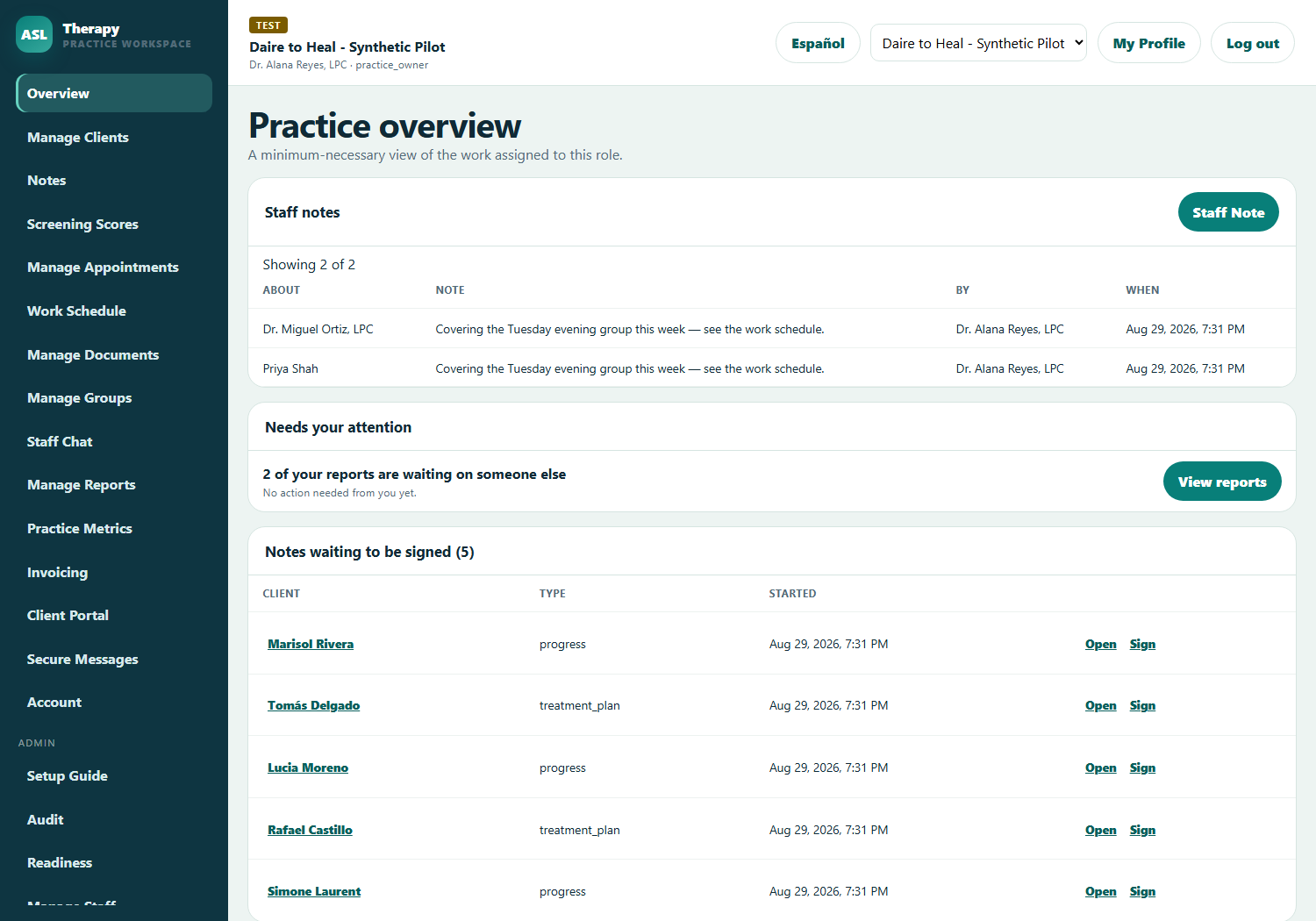
The overview is a working queue, not a vanity dashboard. It surfaces the notes you have not signed yet, the invoices that are issued and unpaid, the clients missing required paperwork, and any attendance violations against your practice’s policy — each one linking straight to the thing that needs doing.

What it shows is scoped to the person looking. A scheduler sees appointments; a billing specialist sees invoices; a therapist sees their caseload. Nobody needs a “minimum necessary” lecture, because the screen simply never contains what they should not see.

Practice overview showing notes waiting to be signed and issued unpaid invoices
Practice overview, shown with demonstration data.

A client record that respects who may open it

Intake opens a record in under a minute, with templates for general intake, mental health assessment, substance use, sex-offender evaluation, domestic violence, family, couples and juvenile work — and you only see the templates matching the specialties your practice actually offers.

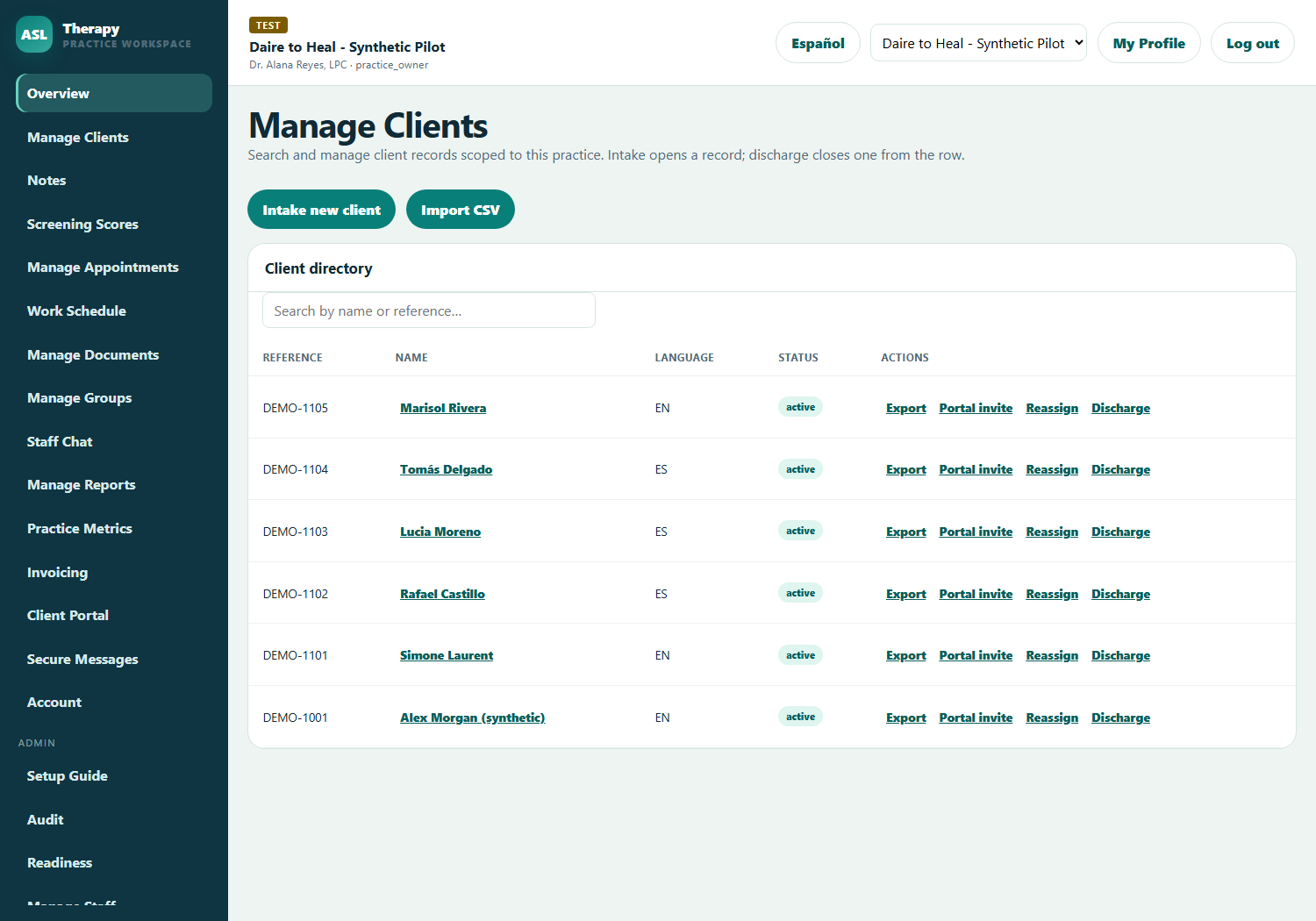
Every client carries a visibility setting: the whole practice, only assigned clinicians, supervisors, or practice owners alone. That rule is enforced on the server for every route, so a client outside your scope is not merely hidden from a list — the record cannot be opened even by someone holding a direct link to it.

  • Bulk CSV import for practices moving off another system
  • Per-client preferred language, which drives their portal and every notice they receive
  • Discharge closes a record properly: successful, termination, lateral transfer or administrative
Client directory listing reference codes, preferred language and status
Client directory, scoped to what the signed-in role is permitted to see.

Clinical documentation that behaves like a clinical record

Eleven note templates ship ready to use — progress, SOAP, DAP, BIRP, GIRP, PIRP, SIRP, treatment plan, treatment plan review, case coordination and safety plan — each rendered as real fields rather than a blank box, so the structure survives whoever is typing.

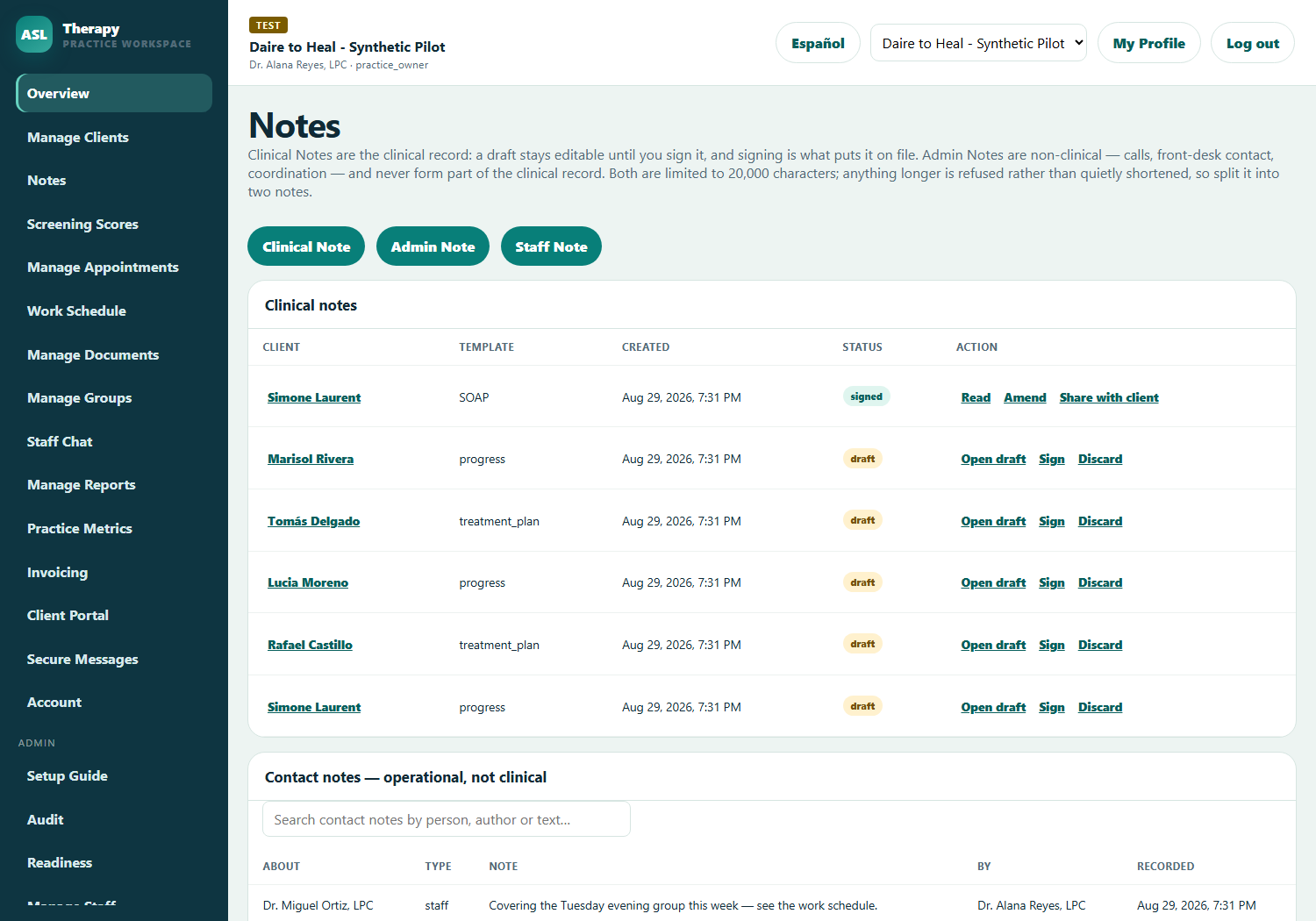
Drafts autosave while you write. Signing is what commits a note to the record, and a signed note is never edited: corrections are filed as amendments that preserve the original and chain to it. Administrative contact notes stay deliberately separate from the clinical record, because a call from the front desk is not treatment.

Clinical notes list showing note templates with signed and draft status
Notes, with draft and signed states and signing available inline.

Scheduling that already knows how you bill

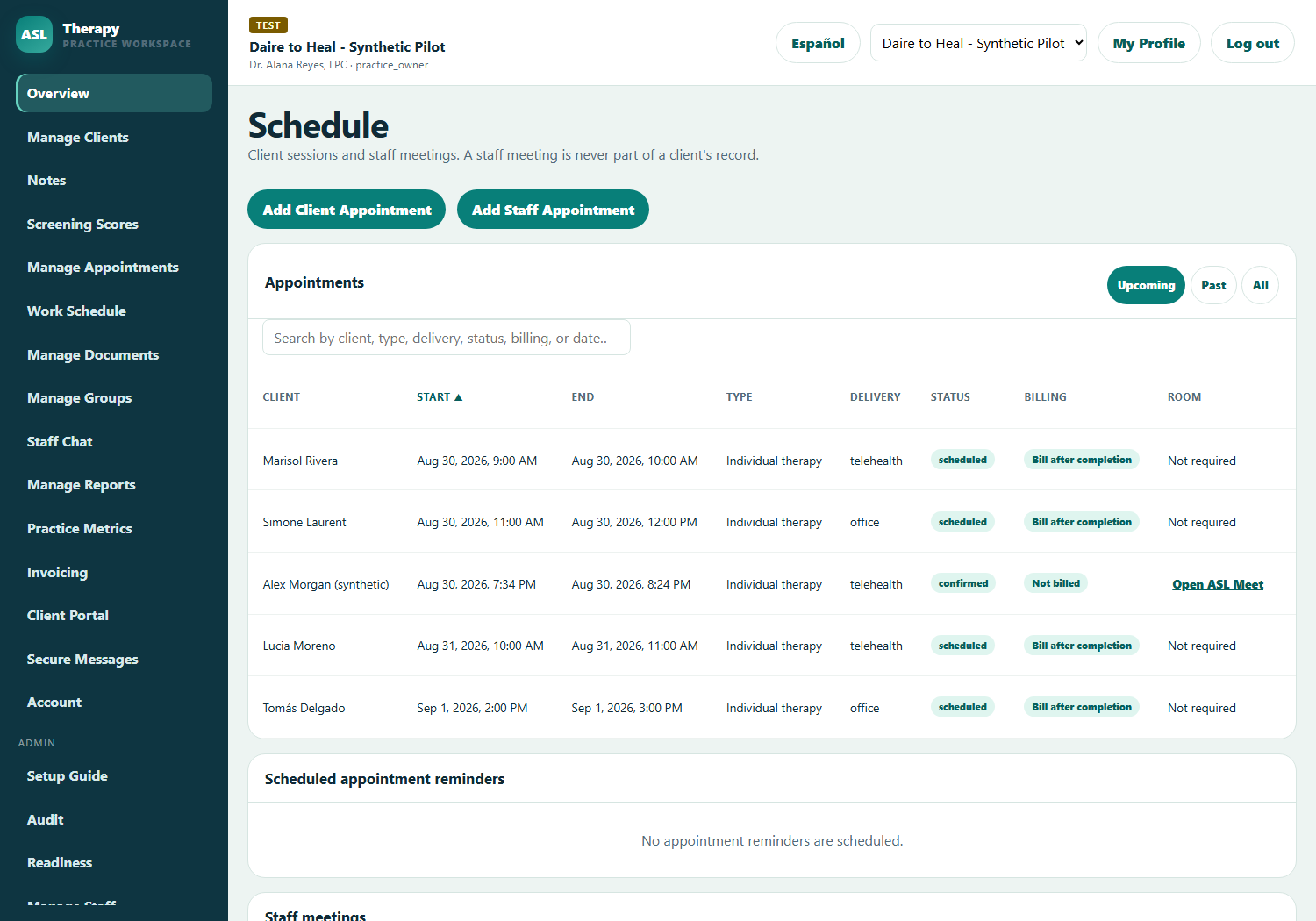
Book office, telehealth or phone sessions against a client and a service rate at the same time. Completing a billable appointment drafts the invoice for you — no second pass through a billing system, and no sessions quietly missed at month end.

Reminders go out by email and, where the client has consent on file, by text. Consent is recorded on the client record with its method and date, and a client who replies STOP cannot be overridden by staff. No-shows are captured as excused or unexcused and counted against the attendance policy your practice sets.

Appointment schedule showing delivery mode, status and billing state per row
Appointments with delivery mode, status and billing state on a single row.

The staff roster lives beside the clinical schedule

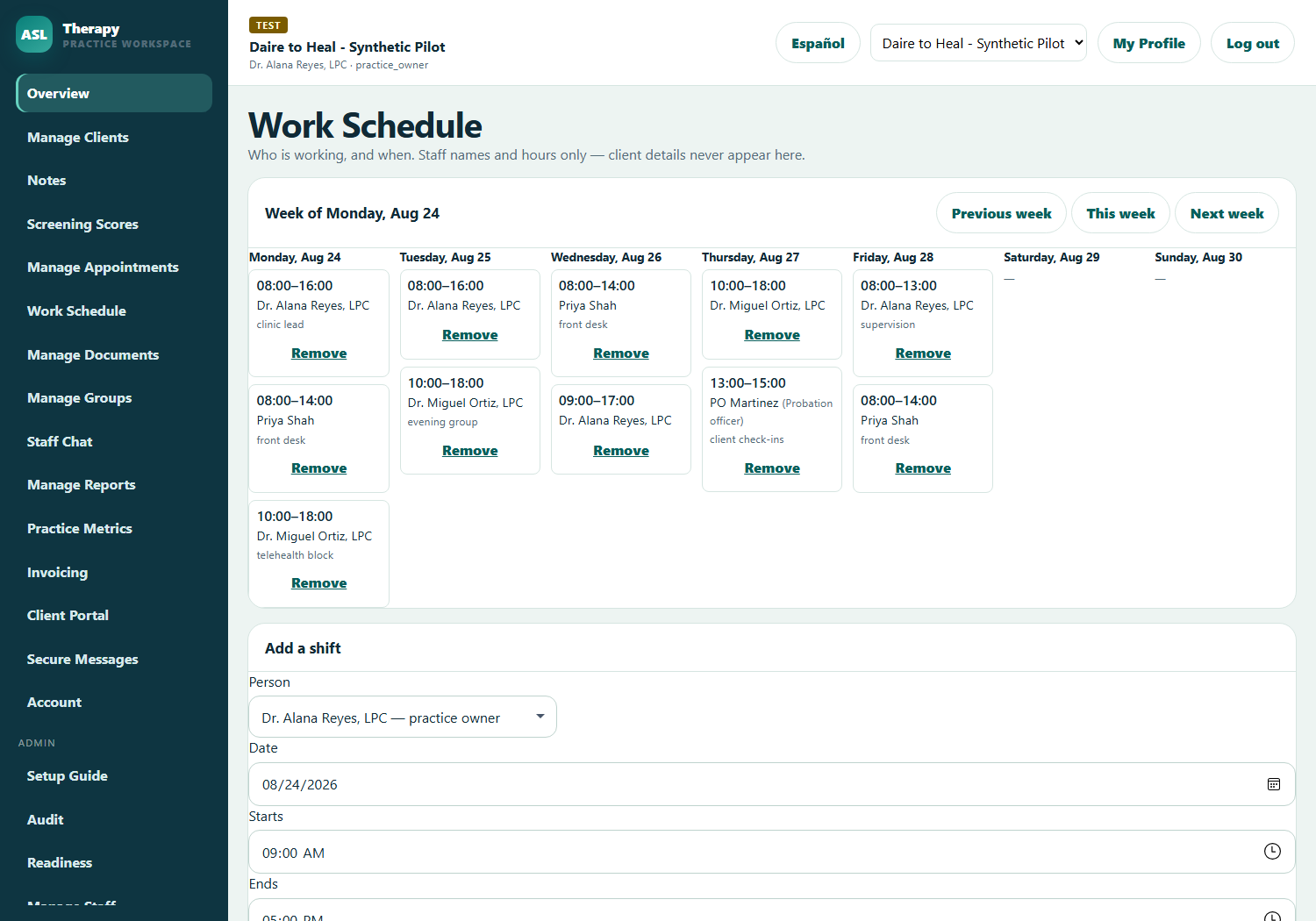
Practice owners, schedulers and admin assistants build the week’s work schedule — who is in, from when to when, with a note for what they are covering. Every member of the practice can read it, so “who has the front desk on Thursday” stops being a group text. Outside people who keep regular hours with your practice — a supervising probation officer’s check-in block, a contract interpreter — can hold shifts on the same board.

The roster deliberately carries names and hours only. Client details never appear on it, so it can be printed and pinned to a wall without exposing a chart. Adding or removing a shift is written to the practice’s tamper-evident activity history like every other change.

Work schedule week showing staff shifts per day with names and hours only
The week’s work schedule: staff names and hours, never client details.

Billing without leaving the clinical system

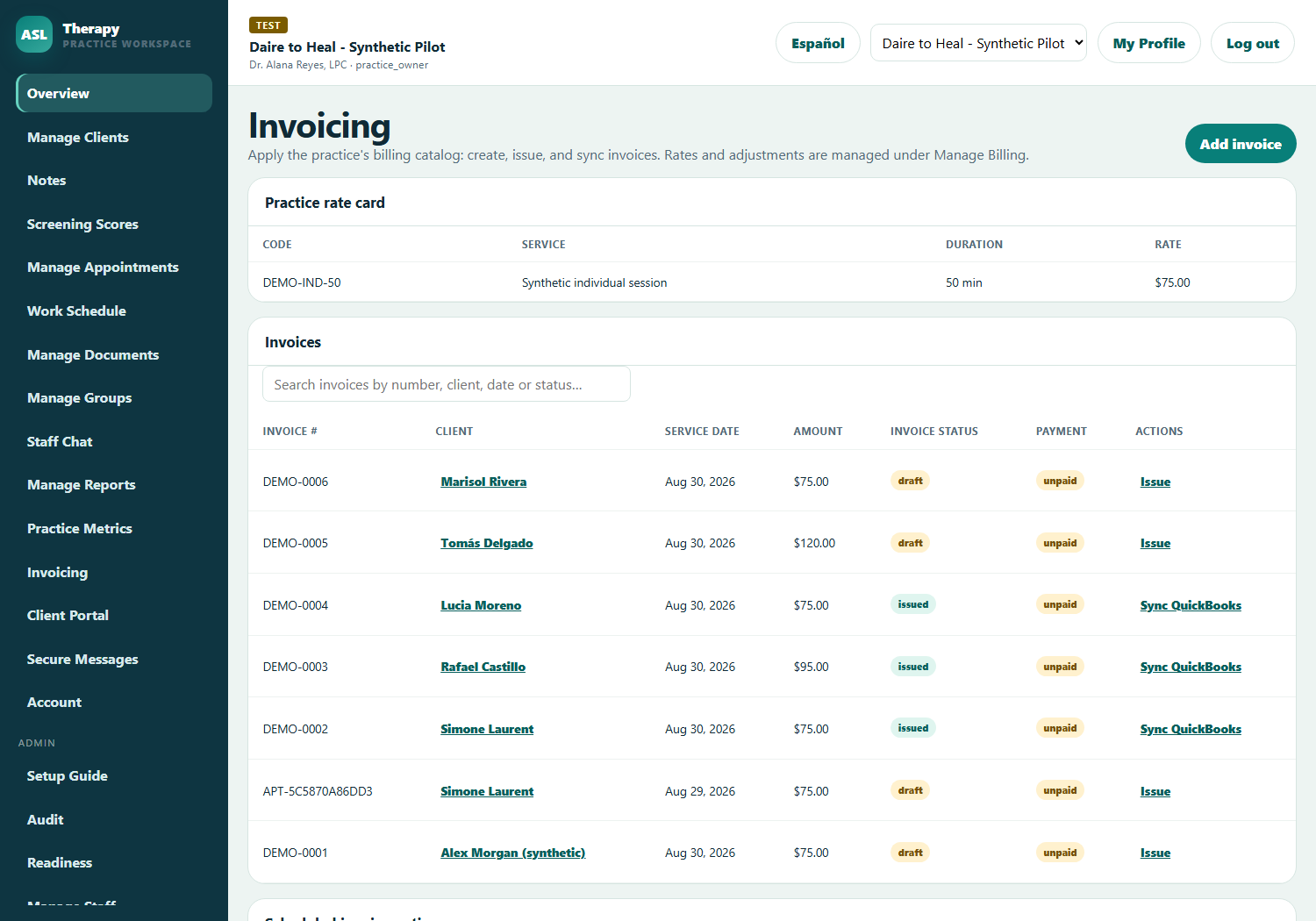
Build a rate card once — individual, family, group, intake, or your own codes — and invoices follow from the work itself. Drafts stay editable; issued invoices are locked and corrected by voiding and reissuing, which is what a reviewer expects to find.

Clients can pay online through Stripe from their portal. Invoices sync to QuickBooks carrying only opaque identifiers, amounts and a generic professional-service label — never a diagnosis, a note or a report narrative. Third-party payers are handled properly too: vouchers from probation, a court, a county or a grant draw a client’s balance down and mark the invoice paid once fully covered.

Invoicing view showing draft and issued invoices with amounts and status
Invoicing, with drafts, issued invoices and third-party payer vouchers.

A client portal your clients will actually use

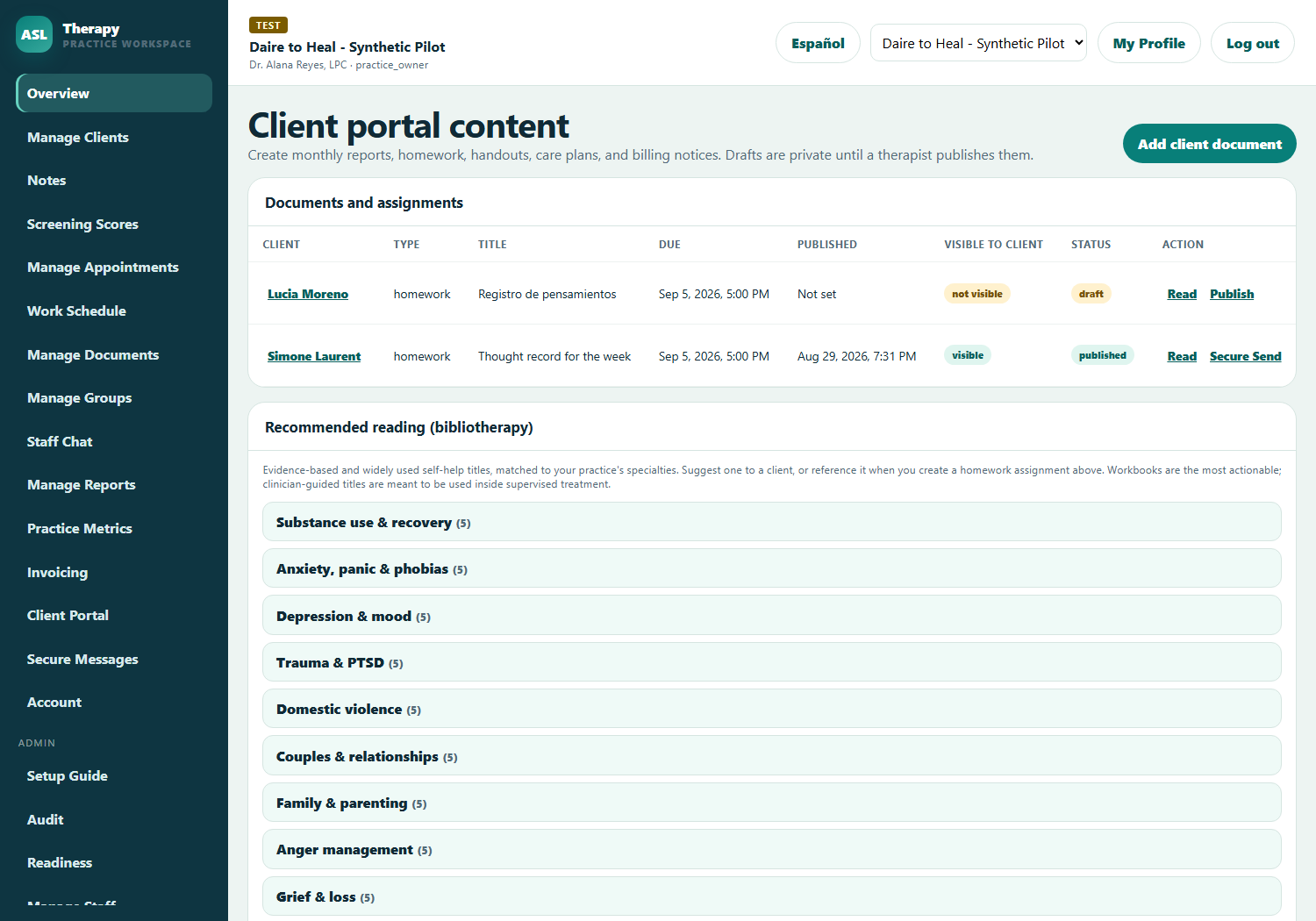
Invited clients get their own authenticated portal showing their upcoming appointments, their invoices with a secure payment button, and any documents or homework you have published to them. Nothing appears there until a clinician publishes it — a prepared copy stays private until a person decides to release it.

Homework is completed in the portal and returns straight into the record. If the client’s preferred language is Spanish, their entire portal — and every appointment reminder, invoice notice and cancellation message they receive — is in Spanish automatically.

Client portal management showing published documents and assigned homework
Client portal management: prepare, review, then publish.

Court and board reporting with a real second signature

Progress reports to probation, parole, a court or the Colorado SOMB are drafted in the workspace with the official standards searchable beside the narrative, so you can quote the governing section while you write instead of hunting through a PDF.

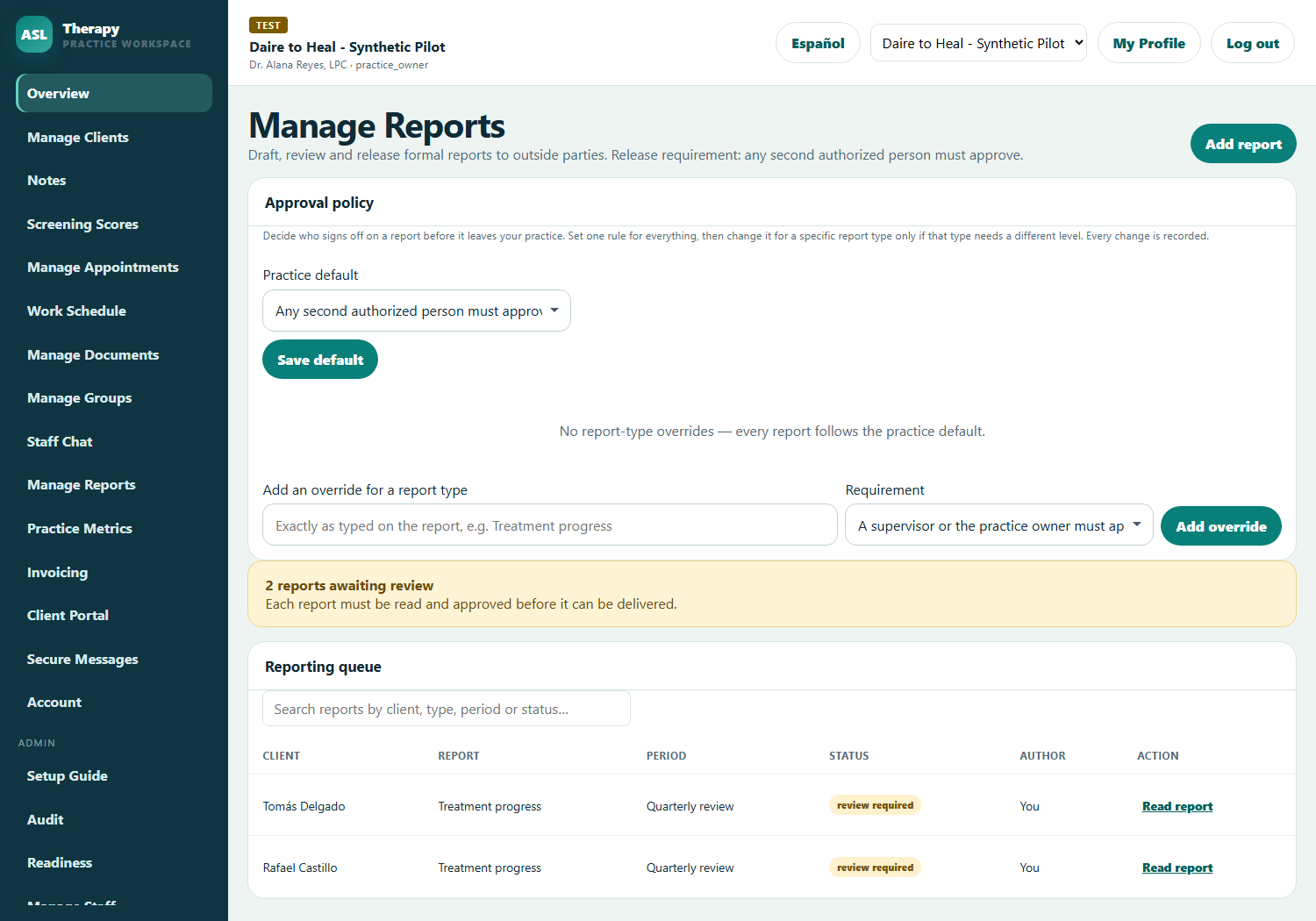
A report enters a review-required state, and its author cannot be the approver. You choose the level that fits your practice — any second authorized person, a supervisor, or, for a genuine solo clinician, explicit self-release — and every one of those choices is written to the audit log. Approval never transmits anything: delivery stays a deliberate human act, with the intended recipient shown for verification first.

Reporting queue showing review-required status and approval policy
Reporting queue, with two-person approval enforced by the server.

Role-based access, done properly

Permissions that survive contact with a real practice.

Most practice software ships three or four fixed roles and hopes your organization happens to match one of them. Real practices never do. You have a therapist who also runs intakes, an office manager who raises invoices but must never open a chart, a supervisor who oversees two clinicians and nobody else, and a contract auditor who needs the activity history for a week and nothing else ever again. When the software cannot express that, practices do the dangerous thing: they share a login, or they give someone administrator rights “temporarily” and forget.

ASL Therapy separates the two questions that most systems collapse into one. What is this person’s job? And what, specifically, are they allowed to do? Answering them separately is what lets the permission model bend to your practice instead of the other way around.

Layer one

The base role

Ten roles covering how therapy practices are actually staffed: practice owner, therapist, intake therapist, scheduler, billing, accountant, admin assistant, security, auditor and platform administrator. The role sets the sensible default.

Layer two

Per-person capabilities

Intake, discharge, clinical supervision, invoicing, billing administration and record export are granted to individuals, independently of their title. Two therapists can differ on every line.

Layer three

Per-client visibility

Each client record is visible to the whole practice, only assigned clinicians, supervisors, or practice owners alone. The narrowest applicable rule wins.

Deny by default, and an explicit denial always wins. A role that is not recognised receives the narrowest possible access rather than the widest — the opposite of the common failure where an unmapped role silently inherits administrator rights. If a practice owner explicitly denies someone a capability, no job title, no supervision relationship and no later role change quietly restores it. That single rule prevents the most common way permission systems rot: exceptions granted in a hurry that nobody remembers to revoke.

Every rule is enforced on the server, on every request. This is the difference between a permission system and a cosmetic one. Hiding a menu item is not access control; it stops an honest person and nobody else. In this system the navigation reflects your permissions, but the navigation is not what protects the record. A client outside your visibility cannot be opened even by someone holding a direct link to it, and the same check runs again on every note, report, document, invoice and export attached to that client. We audited exactly this in August 2026, found a handful of routes that trusted the identifier without re-checking visibility, and fixed all of them before launch — that audit and its findings are documented publicly in the product repository.

Supervision is a relationship, not a rank. A supervisor sees the work of the specific people they supervise. By default they can also see the whole practice, because that is what most group practices expect on day one — and an organization administrator can switch that off with a single control, narrowing every supervisor to their own clients plus their supervisees’. Clients marked owner-only stay owner-only either way, so a sensitive record does not become visible to a dozen people because someone was promoted.

Changes are evidence, not just settings. Granting a capability, denying one, changing someone’s role, disabling an account and relaxing the report-approval rule are all written to the tamper-evident activity history with who did it and when. Access reviews stop being an archaeology project: the answer to “who could see this, and since when” is already recorded. The system also refuses to leave a practice without an owner and will not let the last administrator disable themselves.
The ten base roles and their defaults. Every one can be widened or narrowed per person, and each row below is what someone receives before any capability grant or denial is applied.
RoleDefault access
Practice ownerThe whole practice, including audit, readiness evidence, billing administration, Shredder policy and staff permissions
TherapistTheir caseload: notes, assessments, groups, reports, client portal, documents and metrics
Intake therapistBrings clients in and assigns them; deliberately no clinical notes, assessments or reports unless granted
SchedulerDirectory and calendar only; no clinical content of any kind
BillingInvoices and payments; never a note, diagnosis or report narrative
AccountantInvoicing and financial records; no client directory access
Admin assistantFront-office work: directory, calendar, contact notes; clinical access only if granted
SecurityIncidents, access reviews and operational evidence; no client charts
AuditorActivity history, readiness evidence and documents; no client charts
Platform administratorASL support identity; cross-practice access requires an explicit, time-bound grant from the practice owner, and every use is recorded

The rest of the workspace

The parts that usually live in five other tools.

The tour above covers the daily loop. What follows is everything else a practice needs before it can actually leave its old systems behind.

Clinical work beyond the one-to-one session

Groups, couples and family work

Group work breaks most practice software, because the software assumes one note belongs to one client. Here a group note is written once and filed to every current member’s individual record, which is what the clinical record actually requires. If a member leaves the group later, the notes written while they attended stay on their file — history is not rewritten by a change in membership. Group sessions schedule one appointment per member, so attendance, no-shows and reminders all work per person, while billing stays per client and per rate.

Membership is treated as history rather than a current-state list, so you can answer “who was in the room on this date” months later. You can move an entire group into another group when a cohort advances a phase, either transferring members across or adding them to a second group while they remain in the first. Groups can be closed without deleting anything, reopened if a cohort resumes, and duplicated when you run the same programme again with new members. Every one of those actions is written to the group’s own history alongside the practice-wide audit trail. Cancelling a session notifies every current member by email, and by text where consent is on file, without ever naming the group in the message. And when a member’s record is exported, the other members’ names are automatically replaced with pseudonyms, so one client’s records request does not disclose who else was in their group.

Structured treatment programmes

Ten-module curricula ship with the product, each built on a cited evidence base rather than assembled from whatever was lying around. The offense-specific programme maps directly onto the Colorado SOMB Adult Standards’ required core treatment concepts and integrates the Good Lives Model throughout; the others cover domestic violence, substance use, trauma, CBT and DBT skills, anger, grief, couples and family work, and child and adolescent treatment. Programmes are gated to the specialties your practice offers, so a general mental-health practice never sees sex-offender modules and vice versa. Each programme lists its sources on screen, so the clinician can see what the curriculum is grounded in instead of trusting a vendor’s claim.

Every module carries client-facing worksheet prompts written in plain language. Assign one and it becomes a homework document in that client’s portal automatically, where they complete it online and it returns straight into their record — submitting it marks the module complete without anyone re-keying anything. If the client would rather work on paper, the same worksheet prints as a PDF or downloads as a DOCX with your practice letterhead. Modules can be marked complete manually when the work happened in session, and reopened if a client needs to revisit one. Enrollment progress is visible on the client record, so a supervisor or a covering clinician can see where someone actually is in the programme. A separate curated reading list, matched to your specialties, lets you assign a book as homework the same way, with workbooks and clinician-guided titles clearly distinguished from self-help.

Screening scores and measurement

Record PHQ-9, GAD-7 or your own instrument against a client and watch the number move across the course of treatment. Scores are stored as structured data rather than buried in note text, so change over time is visible at a glance on the client record. That matters for supervision, for outcome reporting to a funder, and for the simple clinical question of whether what you are doing is working.

The product takes a deliberate position here: a screening score is a signal, never a diagnosis. Every result is recorded as awaiting clinician review, and the system will refuse to share a raw score with a client through the portal until a clinician has written down what it means. That is not a limitation, it is the point — sending an untranslated PHQ-9 of 22 to a client’s phone is precisely the harm this design prevents. The clinician’s interpretation is encrypted like any other clinical content and stored with the result, so the record shows both the number and the judgement applied to it. Results appear on the client record next to the notes and appointments from the same period, which is where the pattern usually becomes obvious. A supervisor reviewing a caseload can see at a glance which clients are improving and which are not, without opening every chart. Scores can be shared with the client through the portal once interpreted, so the conversation about progress is grounded in the same number you are looking at. Nothing here produces an automated diagnosis or a treatment recommendation, and no score is ever transmitted to a third-party analytics service.

Working with clients and outside parties

Documents and Secure Send

The practice document library holds the blank forms and paperwork your staff reach for — intake packets, disclosure statements, releases, policies — encrypted at rest in the platform document store. Visibility is set per document: the whole practice, administrators only, or just you. Documents can be attached to the required-documentation checklist so staff download the correct current version rather than an old copy from someone’s desktop.

Getting a document to an outside party is where most practices quietly break their own security policy, by emailing a PDF. Secure Send exists so they do not have to. It delivers any document as a password-protected link that expires, with a strict open limit, and the recipient gets the link by email while you relay the password on a separate channel — a phone call or a text. That two-channel split is the whole point: an intercepted mailbox yields a link that cannot be opened. Every send is recorded. For the opposite problem, an accidental or wrong upload, the ASL Shredder removes the active encrypted object after a two-step confirmation in which the person must type an exact phrase generated by the server. Shredding is deliberately blocked for anything attached to a client, used as a template, under legal hold, or inside a retention period, and the product is explicit that encrypted backup copies remain governed by the documented retention schedule rather than vanishing.

Messaging, staff chat and support

Client messaging is structured and stays inside the practice boundary, with delivery status visible so you know whether something actually arrived. It is not a replacement for a crisis line and the product says so plainly on every public page. Internally, staff chat gives the team somewhere to coordinate that is not a personal group text on someone’s phone — the place where client details end up when the software provides no alternative.

Staff notes work as a practice bulletin board for the operational things that are nobody’s clinical record: who is out sick, that the front-door code changed, which room is unavailable. Contact notes cover the other half of front-office reality — calls, visits, deliveries, messages left — and are deliberately kept separate from the clinical record, because a voicemail from a probation officer is not treatment and should not sit in a chart as though it were. A tracked support ticket queue handles administrative requests, either inside your practice or to ASL support, so those requests have a record instead of living in one person’s inbox. Messages to clients respect the same consent rules as reminders: a client who has opted out of text messages cannot be sent one by a staff member who forgot. Delivery failures are visible rather than silent, so a bounced address is something you discover before the client misses an appointment rather than afterwards. Each of these surfaces is permission-scoped like everything else, and none of them is a route around the clinical record’s access rules. Nothing in chat or tickets is treated as part of the clinical record, and the interface says so, because the moment staff believe otherwise the real record starts losing content.

Required documentation and attendance

Every practice has paperwork that must exist in every file, and every practice discovers the gaps during an audit rather than before one. Define your requirements once — release of information, a state disclosure, a billing agreement, whatever your board expects — and staff see an outstanding-items banner on each client until each one is recorded. Attach the blank form to the requirement and the checklist links straight to the current version. Requirements can be retired without deleting the history of what was collected under them.

Attendance works the same way: set how many unexcused absences your practice permits and over what window, either a rolling year or the calendar year. Clients at or over the limit are flagged on the practice overview and on their own record, so the conversation happens before it becomes a discharge. No-shows are captured as excused or unexcused at the moment the appointment is updated, with an optional detail note, rather than reconstructed later from memory. The limit and the client’s standing print on progress reports to supervising officers, which is exactly what a probation officer is asking about. Practices that do not want an attendance policy simply leave the limit blank and nothing is enforced.

Bilingual operation, guidance and evidence

English and Spanish, throughout

Bilingual support in most software means a translated marketing page and nothing else. Here it means the working software. Staff switch the entire workspace between English and Spanish with one control in the header, and the choice persists for that person — navigation, every screen, dialogs, confirmations, tables and the empty states all change. The Help Centre, the role guides and the procedure library switch with it, because guidance in a language you do not read is not guidance.

On the client side it is driven by the language recorded on their file rather than a setting they have to find. A Spanish-speaking client receives their entire portal in Spanish, along with every appointment reminder, invoice notice and group-cancellation message. Carrier keywords like STOP and HELP deliberately stay in English inside Spanish text messages, because those are the literal words the carrier acts on and translating them would break the opt-out. Intake templates, consent language and the public site are bilingual too, so a practice serving Spanish-speaking clients is not stitching translations together at the edges. Clinical content itself is never machine-translated — what a clinician wrote is what the record contains, in the language they wrote it.

Standards lookup and the Help Centre

Colorado practices get the DORA board rules and the SOMB standards searchable in plain language from inside the app. Describe the requirement in your own words — you do not need the rule number — and the closest matching official sections come back with the source and the date the text was retrieved. Results are presented as candidate sections to verify, never as legal advice, and every one links to the official document so you confirm it yourself. The SOMB lookup sits inside the report-drafting dialog specifically, so you can quote the governing standard while writing the narrative rather than switching to a PDF and losing your place. Search wording leaves the workspace, so the interface warns you to describe the requirement and never a client.

The Help Centre carries forty-one reviewed topics in English and Spanish, and it is filtered to the permissions you actually hold. Someone without the export capability is never shown instructions for exporting records; someone with a delegated invoicing grant sees the invoicing guidance that a therapist without that grant does not. Every role also has a dedicated guide covering what the role is for, the safe workflow, the boundaries, and how to escalate. There is a read-only answer engine alongside it that cites the reviewed material it drew from and abstains when it does not have a grounded answer, rather than inventing one. It takes no actions and the interface tells you not to enter client details, credentials or identifiers into it.

Audit, encryption and recovery

Clinical fields, client identifiers, message bodies, report narratives and document contents are encrypted at rest with AES-256-GCM, with searchable fields protected by blind indexes so the practice can still find a client by name without the database holding that name in the clear. Staff sign in once through the shared Auto Secure Login service and carry that one account across every ASL application. Multi-factor authentication is included and shaped for how a small practice actually runs: an authenticator app, or one-time codes by email or text message, with self-service password reset from the sign-in page itself. The server enforces its own idle timeout rather than trusting the browser — a person can choose to be signed out sooner, never later.

The activity history is a hash chain: each recorded event is bound to the one before it, so alteration or deletion is detectable rather than merely discouraged. The chain can be verified on demand from inside the app, and the verification anchors against external evidence written outside the database, which is what stops someone with database access from quietly rewriting history and recomputing the chain to match. Reading the audit page is itself an audited act. Backups run nightly, encrypted, and are restore-tested automatically before the backup is recorded as good — an untested backup is a hope, not a backup, and the manifest records the outcome of an actual restore and integrity check every time. Retention is pruned by name rather than by timestamp, a deliberate choice after a timestamp-based prune elsewhere on the platform deleted the newest release instead of the oldest. Practice data is isolated per organization at the database level, so one practice cannot reach another’s records even in the event of an application bug. ASL support has no standing access to your practice: cross-practice entry requires an explicit grant from the practice owner, is time-bound, can be revoked instantly, and every use of it is recorded and visible to you. The product ships with a readiness workflow that tracks the organizational controls — risk analysis, agreements, training, incident procedures, recovery tests — because the software controls described here are only half of what an actual compliance programme requires.

Designed around the real work

From first inquiry to reviewed reporting.

Attract

Search-friendly service pages and a clear pilot funnel.

Intake

Bilingual, validated forms with appropriate consent boundaries.

Care

Calendar, video, notes, assessments and secure coordination.

Collect

Invoices and superbill-ready records with transparent status.

Report

Human-approved delivery to authorized referral sources.

Compliance before clinical data

A safety gate, not a marketing badge.

The pilot blocks live PHI by default. Encryption and audit logs are only part of the work; activation also requires organizational safeguards, contracts, incident procedures and qualified review. Review the technical safeguards and remaining obligations.

Synthetic-data pilot
Security Risk Analysis and risk-management plan
Customer and subprocessor Business Associate Agreements
Access review, workforce training and minimum-necessary roles
Incident response, breach notification and recovery tests
Clinical template, consent and retention-policy approval

Built to license

Start focused. Expand without re-platforming.

Pilot

Founding practice

By review

  • Synthetic-data workspace
  • Workflow configuration
  • Compliance readiness map
  • Founding-customer feedback loop
Expandable

Group practice

Custom / organization

  • Role-based teams
  • Up to 25 included seats
  • Audit and supervisor views
  • Specialty workflow modules

Frequently asked questions

Clear answers before a practice pilot.

Can independent therapists and group practices both use it?

Yes. The product uses isolated practice organizations, roles, and seat limits. A solo plan can remain focused while group and enterprise plans support specialized staff and oversight roles.

Does the platform include telehealth?

Appointments are prepared for protected ASL Meet links. Live clinical use still requires an approved video configuration, contracts, notices, identity mapping, recording policy, support process, and acceptance testing.

How do staff sign in? Is multi-factor authentication included?

Every staff member holds one Auto Secure Login account and uses it across every ASL application, at a single sign-in page. A second factor is required, and each person uses what actually fits them: an authenticator app, or one-time codes by email or text message. Password reset is self-service from the sign-in page, and the workspace enforces a server-side idle timeout on top of it.

Does an assessment score create a diagnosis?

No. Screening results are recorded as awaiting clinician review. The platform does not make an automated diagnosis or replace professional judgment.

How are court and SOMB reports handled?

A report starts in a review-required state. Its author cannot serve as the required second reviewer, approval is audited, and approval alone does not transmit the document.

We already use another system. How hard is moving?

Clients import from CSV, so the directory moves in one step. Historical notes stay where they are — we do not claim to migrate another vendor’s clinical record, and any vendor who promises that without seeing your export is guessing. Practices typically run the new workspace for new work from a chosen date and keep read access to the old system for the retention period.

Is this workable for a genuine solo clinician?

Yes, with one caveat worth stating plainly: the report approval rule defaults to requiring a second authorized person, which a solo practice cannot satisfy. Set the approval policy to author-release during setup and reports flow normally. Every self-release is recorded in the audit log, which is exactly what a board reviewer wants to see.

Who owns the data, and can we get it out?

The practice does. A full client record exports as a consolidated PDF or as structured JSON, both audited acts. Practice-wide export is available to roles holding the export capability. There is no lock-in mechanism and no charge to leave.

What does it cost?

Pilot pricing is by review, and solo and group plans are quoted per practice rather than published, because seat counts and specialty modules vary widely. Tell us your size and services in the form below and you will get a straight number, not a discovery call sequence.

Can a practice offer English and Spanish intake?

Yes. The public experience and core intake patterns support both languages. Practice-specific terminology and clinical consent content must still be reviewed by the practice.

Licensing pilot

Tell us how your practice works.

Use this business form only for product evaluation. Do not include diagnoses, client names, treatment details or other health information.

No clinical information: This form is for business inquiries and is not a secure channel for client or health information.
Help / Ayuda